A Hundred Agent Sessions on One Box Tips for Running Coding Agents Remotely · Michael Rishi Forrester
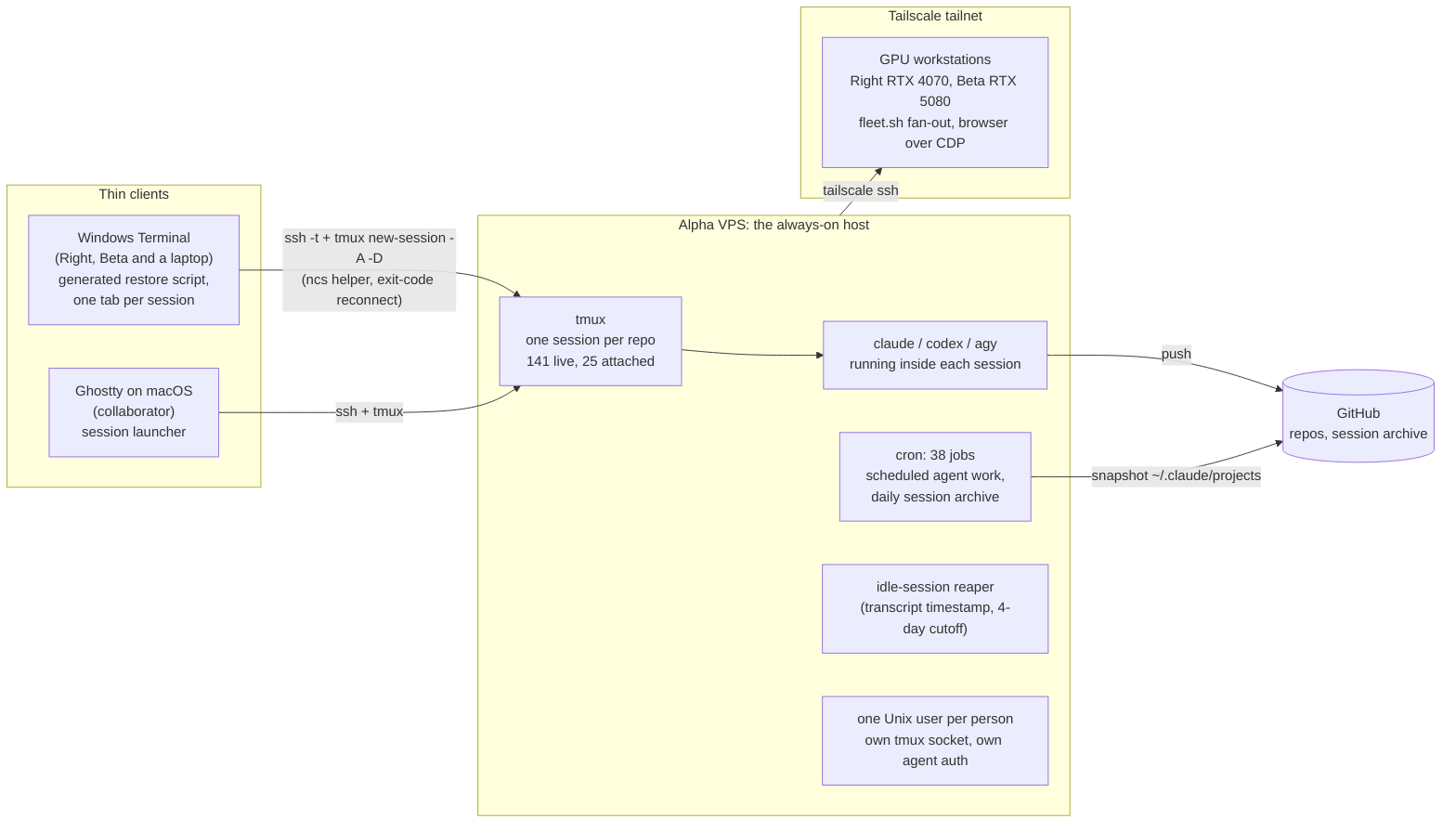
My coding agents don't run on my laptop. I've had as many as a hundred and seventy of them in tmux sessions on one Linux box in a data center, one session per repo. I closed the lid at home, flew here, opened it, and every agent was where I left it. A year ago I ran my coding agents on Kubernetes. For one person it was a beast to maintain, so I backed off to one box.
The whole setup Here is all of it: terminals on my desktop and laptops, SSH into one always-on host, tmux holding a session per repo, the agents inside, and cron beside them. Five tips, with a few more tucked inside them.
Tip 1
Hooks, tests and rules before scale
workflow/llm-coding-workflow/claude-config/settings.json
        "matcher": "Bash",
[...]
            "command": "$HOME/.claude/hooks/check-commit-message.sh"
[...]
    "Stop": [
[...]
            "command": "$HOME/.claude/hooks/auto-test-on-stop.sh"
Play the recording
Tip one sounds backwards: before you run a hundred agents, get really good at running one. One repo, its rules in a file the agent reads, CI on every push, and hooks. Before any shell command runs, a hook checks it, and this one refuses a commit message that credits the AI. When the agent stops, the tests run. Where a command-line tool exists I use it over an MCP server, as Anthropic's own cost guide advises. Here's a recording of a hook saying no.
Tip 2
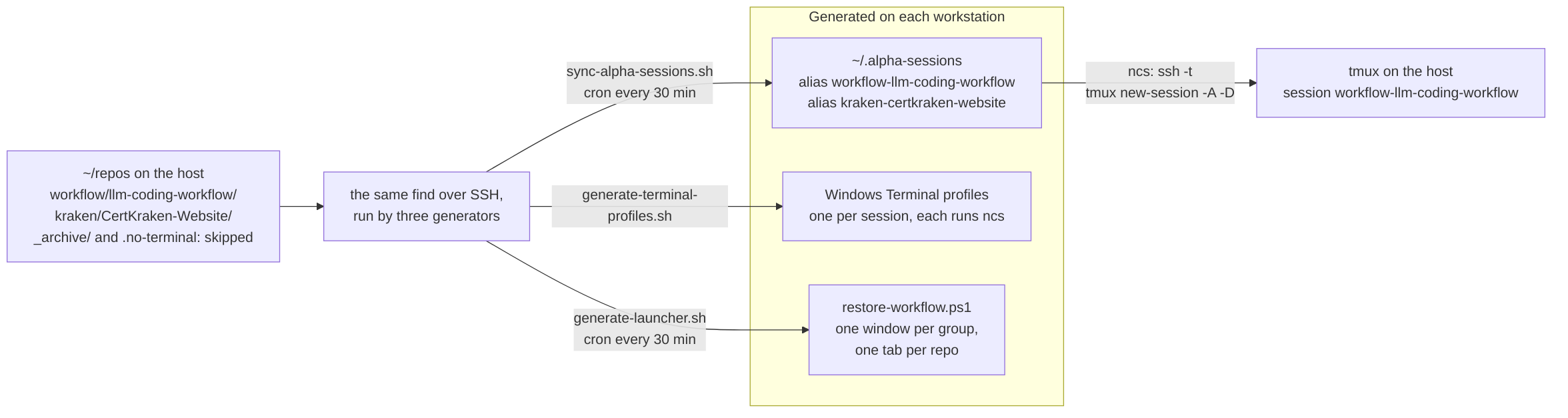
The repo tree is the session list Tip two: group your repos by what they belong to. Start with two folders, personal and professional, and let it grow. Mine is one group per business, brand or book, then the repo, and each group keeps a knowledge repo. My employer's work lives on a separate laptop with its own accounts, and nothing crosses. That tree becomes the session list.
Tip 2
Attach helpers generated from the repo tree
workflow/llm-coding-workflow/wsl2-specific/sync-alpha-sessions.sh
    # Alias format: group-reponame (e.g., kk-ginseng, mrf-ptos)
    alias_name="${norm_group}-${norm_leaf}"

    # Session name matches alias name for simplicity
    session_name="${alias_name}"
[...]
    ALIASES+=("alias ${alias_name}='ncs ${session_name} ${repo_path}'")
workflow/llm-coding-workflow/generated/right/alpha-sessions
alias workflow-llm-coding-workflow='ncs workflow-llm-coding-workflow /home/michael/repos/workflow/llm-coding-workflow'workflow/llm-coding-workflow/wsl2-dotfiles/crontab
*/30 * * * * /home/michael/scripts/sync-alpha-sessions.sh [...]Play the recording
A script walks that tree over SSH and writes one shell alias per repo, named group dash repo, and the tmux session gets the same name. Every alias calls one function, ncs. Cron reruns it every thirty minutes, so a repo I clone in the morning has an alias by lunch, and tab completion reads the same list. The same walk writes the terminal profiles and the restore script in tip four. Here's a recording of it running.
Tip 3
tmux settings that follow whichever screen you're on
workflow/llm-coding-workflow/alpha-specific/tmux.conf
set -g window-size latest
set -g aggressive-resize on
[...]
set-hook -g client-attached "resize-window -A"
[...]
set-hook -g client-resized "resize-window -A"
Play the recording
Tip three: get your agents off your laptop. We run smart, untrusted software next to our browser sessions and saved logins. Give it a box that holds only the code and narrowly scoped tokens: a server, an old laptop on Debian, a Raspberry Pi, all on Tailscale. The next step is a vault for those tokens, and getting there has been tough. It never sleeps, and every screen becomes a thin client, so tmux has to follow whichever screen you're on. window-size latest sizes each window to the client with the most recent activity, and two hooks run resize-window on every attach and every resize. resize-window switches the window to a manual size, so with only the attach hook a window stays stuck. This recording shows both screens.
Tip 4
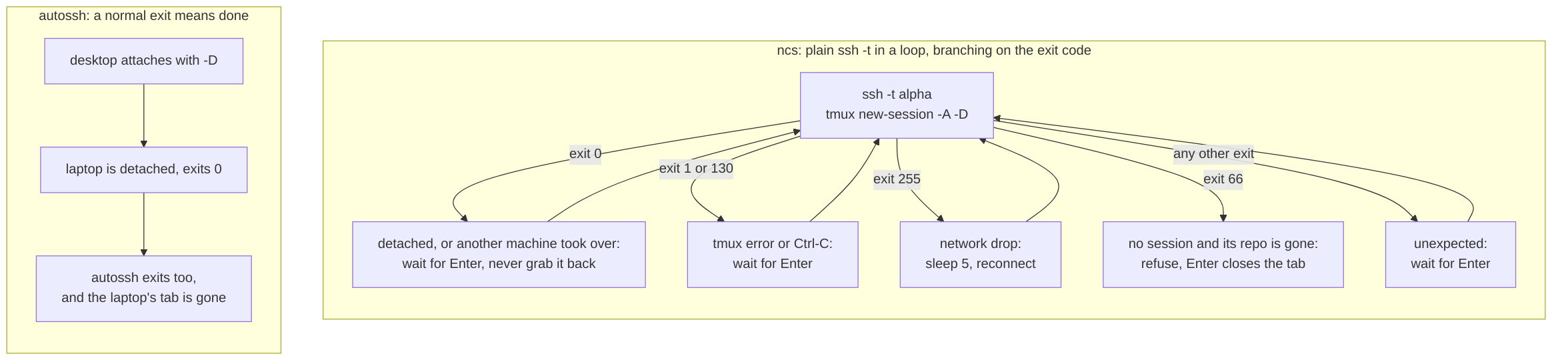
A reconnect loop that beats autossh Tip four: manage connections so you never retype an SSH command. Profiles, groups, reconnects and restore, plus remote control and a Discord bot for my phone. Attaching is one command: tmux new-session dash A dash D. Dash A attaches or creates, and dash D detaches every other client, so whichever machine I'm sitting at wins. The machine that loses prints detached, and its tmux client exits with status zero, exactly like a detach I asked for. autossh reads a zero exit as done and quits, so the laptop's tab is gone when I walk back to it.
Tip 4
Branch on the exit code
workflow/llm-coding-workflow/wsl2-specific/sync-alpha-sessions.sh
    while true; do
        ssh "${ssh_opts[@]}" -t alpha "[...]tmux new-session -A -D -s ${session} -c \"${repo_path}\""
        local rc=$?
        case $rc in
[...]
            0)
                echo
                echo "[ncs] detached cleanly. Press Enter to re-attach, Ctrl-C to exit."
                read -r
                ;;
[...]
            255)
[...]
                    echo "[ncs] connection lost (network/ssh). Reconnecting in 5s... (Ctrl-C to abort)"
                    sleep 5
workflow/llm-coding-workflow/wsl2-dotfiles/ssh-config
Host alpha
[...]
  ServerAliveInterval 30
  ServerAliveCountMax 3
So the loop branches on the exit code. Zero is a detach, mine or another machine taking over, and the loop can't tell those two apart: the tab stays open and waits, and Enter takes the session back. One is the tmux server going away. Two fifty-five is ssh itself failing, a real network drop: retry in five seconds. ServerAliveInterval thirty with ServerAliveCountMax three turns a silent dead link into a two fifty-five within two minutes.
Tip 4
One-command workspace restore
workflow/llm-coding-workflow/wsl2-specific/generate-terminal-profiles.sh
cmd="wsl.exe -d ${WSL_DISTRO} -- bash -ic 'ncs ${session_name} ${repo_path}'"workflow/llm-coding-workflow/wsl2-specific/generate-launcher.sh
        echo "# --- ${display_name} (${#sessions[@]} tabs) ---"

        # Build the argument list: first session is new-tab, rest are ; new-tab
        echo -n 'Start-Process wt.exe -ArgumentList @('
workflow/llm-coding-workflow/wsl2-specific/bashrc-alpha-helpers.sh
restore() {
    local ps1="${WIN_SCRIPTS}/restore-workflow.ps1"
[...]
    powershell.exe -ExecutionPolicy Bypass -File "C:\\Users\\${WIN_USER}\\Scripts\\restore-workflow.ps1" -Force
}
Play the recording
Reboots happen, and reopening a hundred tabs by hand doesn't. Each terminal profile runs ncs for its session, and the same tree walk writes one window per group, one tab per repo. Typing restore brings them all back, and since the agents never stopped, every tab opens on a session still mid-task. Here's a recording of the loop.
Tip 5
Cron-driven orchestration that keeps working while you're on a plane
workflow/llm-coding-workflow/alpha-dotfiles/crontab
# Daily durable snapshot of ~/.claude/projects (Anthropic prunes it)
30 4 * * * /home/michael/scripts/claude-session-snapshot.sh [...]
[...]
# Stop agent sessions idle >4d. Runs after the 4:30 snapshot so transcripts are archived first.
0 5 * * * [...] ${R1}/scripts/reap-idle-sessions.sh --apply [...]
[...]
# workflow-knowledge: monthly workflow refresh (workflow-knowledge#3, llm-coding-workflow#218).
# claude -p with a $25 cap and 60 min timeout; commits to staging, exits 1 without committing on any failure.
0 6 1 * * [...] uv run wk refresh [...]
workflow/llm-coding-workflow/alpha-dotfiles/scripts/claude-session-snapshot.sh
# Accumulate. NO --delete: the whole point is to KEEP histories that Anthropic prunes
# out of ~/.claude. Files that disappear upstream stay preserved here.
rsync -a "$SRC" "$LIVE/" 2>>"$LOG"
Play the recording
Tip five: once the work runs without you, go further. The schedule belongs on the host. At four thirty cron copies the agent transcripts into a private git repo, with no delete flag, because the tool prunes its own history. Once a month a headless agent run refreshes my workflow notes with a twenty-five dollar cap on estimated spend and a sixty-minute timeout, and commits to staging or not at all. That is your first agentic loop. From there, add evaluations and better tests, and tie each run to a goal. Here's a recording of the snapshot log.
Get good at one workflow, give your work a shape, get off your laptop, manage connections so you never think about them, then go further. Then a hundred sessions turned into the problem, so in October I built a system that runs agents without tmux: more than seventeen thousand runs in twenty-three days. That's a different talk. Every excerpt on these slides is in the repo behind that QR code. I'm Michael Rishi Forrester. Find me after this or at michaelrishiforrester.com.